An AI video editor for YouTube, from the long video to the Shorts
Quick answer
MirrorCut is an AI video editor for YouTube creators who record themselves. Upload the recording and describe the edit: its AI agent cuts the pauses, filler words and retakes, tightens the opening, adds captions, B-roll, chapter titles and graphics, and cuts Shorts from the same video. Every change is shown on a real timeline for you to accept or revert, and you export MP4 up to 4K.
A YouTube video has a few jobs at once: hook viewers in the first seconds, keep them watching through the middle, and give you Shorts to bring new viewers in. Most of the editing time goes on the same slow work every time: cutting pauses and retakes, finding the strongest opening, adding captions and cutaways, and reframing clips to vertical.
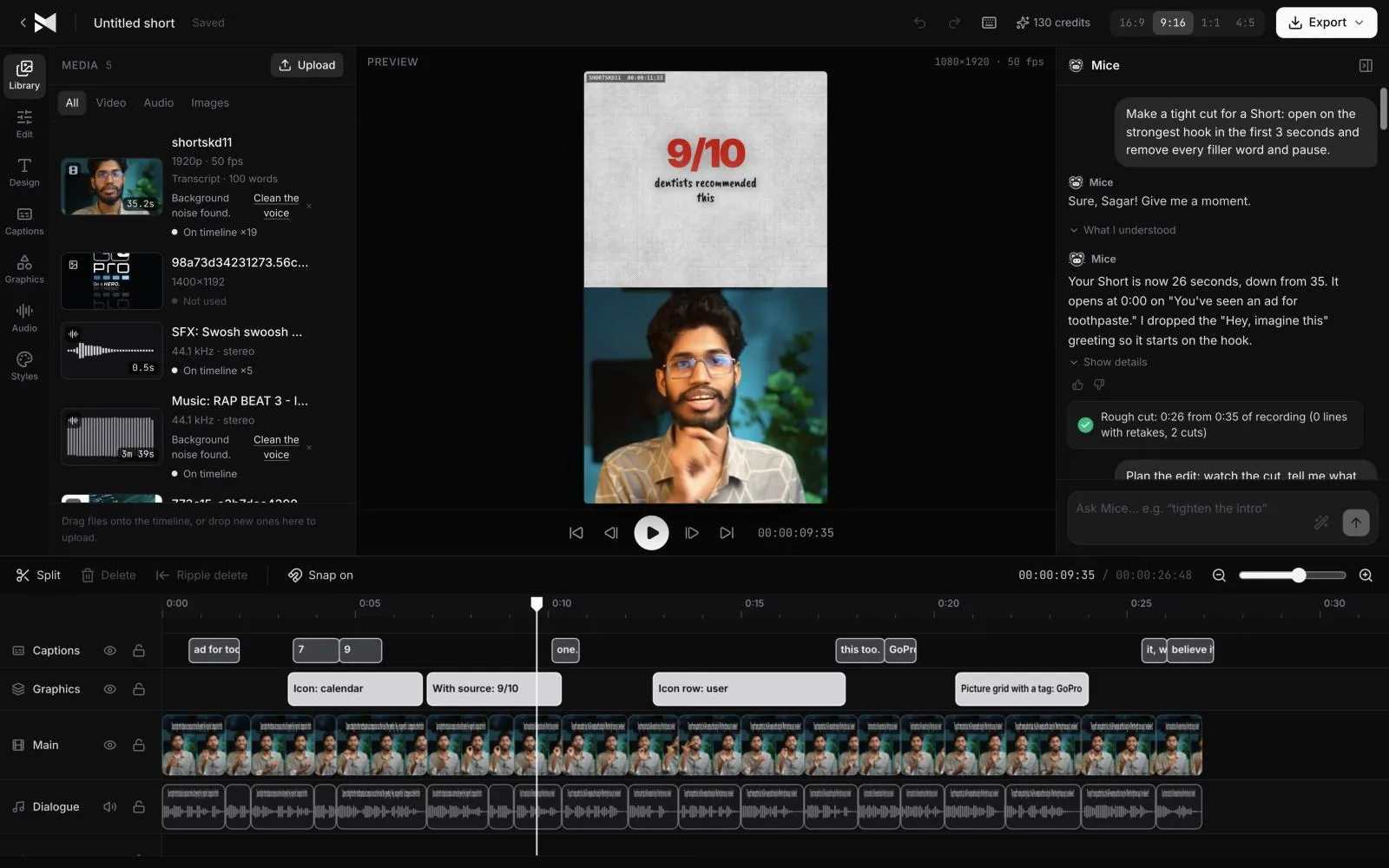
MirrorCut's AI agent does that first pass on your recording. Describe the video you want in plain words; the agent builds an editable cut on a real timeline, and you approve each change, refine it in chat, or edit by hand.
Start your free trial7 days free, then $10 a month. Works in your browser.
The best AI video editors, compared →
Just ask for it
Things you can type to MirrorCut's agent:
- “Tighten the first 30 seconds so the hook lands faster”
- “Remove the dead air, filler words and retakes”
- “Add B-roll when I mention something, and a title at each topic change”
- “Cut the three strongest moments into Shorts with captions”
How it works
- 1
Upload your recording
MP4, MOV, MKV or WebM, from a phone, webcam or camera. Hour-long files are fine; uploads resume if your connection drops.
- 2
Describe the video
Say how long it should be, what to open on, and what to add. The agent builds an editable first cut instead of a finished render you can't change.
- 3
Review, then export
Accept or revert each change, refine through chat or on the timeline, then export the video in 16:9 and the Shorts in 9:16, MP4 up to 4K.
What MirrorCut does
A stronger opening
Ask the agent to open on your best line or tighten the first 30 seconds, where most viewers decide whether to stay.
Pauses, filler and retakes gone
Long pauses are shortened to a natural length, “ums” are cut, and when you say a line twice the cleanest take is kept.
B-roll, titles and graphics
Real stock B-roll when you mention something, and titles, stats, lower thirds and chapter titles from over 200 motion graphics templates.
Shorts from the same edit
The strongest moments become vertical Shorts that follow the speaker, with animated captions in 48 styles, each on its own editable timeline.
Captions for YouTube
Captions stay in sync after every cut, and you can download them as SRT or VTT to upload to YouTube with the video.
You approve every change
Each AI edit is outlined on the timeline and explained in one line. Accept it, revert it, or keep editing by hand; your edits and the agent's share one undo history.
Guides
- How to add chapters to YouTube videosHow to add YouTube chapters with timestamps in the description, YouTube's three rules, automatic chapters, and why chapters sometimes don't show.
- How to edit a talking-head videoHow to edit a talking-head video: cut pauses and retakes, open on your best line, add cutaways and captions, and keep it moving without overdoing it.
- What is an AI video editing agent?What an AI video editing agent is, how editing with a prompt works, how it differs from one-click AI tools and video generators, and what to check before you trust one.
Free tools
No sign-up; they run in your browser.
- YouTube chapters generatorPaste your timestamps and get a YouTube chapter list ready for the description, checked against YouTube's rules: 00:00 first, three or more, 10 seconds each.
- SRT to VTT caption converterConvert caption files between SRT and WebVTT in your browser: paste or drop a file, convert it, and download the result. Nothing is uploaded.
Questions
- Can MirrorCut upload to YouTube for me?
- Not yet. You export the finished video as MP4 (up to 4K) and the captions as SRT or VTT, then upload them in YouTube Studio.
- Does it add YouTube chapters?
- The agent can add a chapter title on screen at each topic change. YouTube's own chapters come from timestamps in the description; our free YouTube chapters generator checks they meet YouTube's rules.
- Is it for faceless channels?
- MirrorCut edits footage you record: talking to camera, screen recordings, interviews and podcasts. It doesn't generate a presenter or voice for you.
- Can I edit by hand too?
- Yes. It's a real timeline editor: edit by hand, through chat, or both, with one shared undo history.
- What does it cost?
- Every account starts with 7 days of Creator free (a card is required). After that, Creator is $10, Pro is $30, Studio is $60 a month, and every yearly payment adds 50 bonus AI credits.
Bring one recording and see your first cut
7 days free, then $10 a month.
Start your free trial