How to turn customer testimonials into video ads
Quick answer
Get the customer's written permission, then use their call recording or phone video. Open the ad on their most concrete line, such as a number or a before and after, cut the pauses and filler, add captions so it works with the sound off, and end on your offer. Keep the real customer: viewers can tell an AI presenter reading a review.
A customer saying, in their own words, what your product did for them is one of the most convincing ads you can run. The problem is the raw recording: a ten-minute call or a phone video with the best line buried in the middle, umms, a shaky start and nothing that works with the sound off.
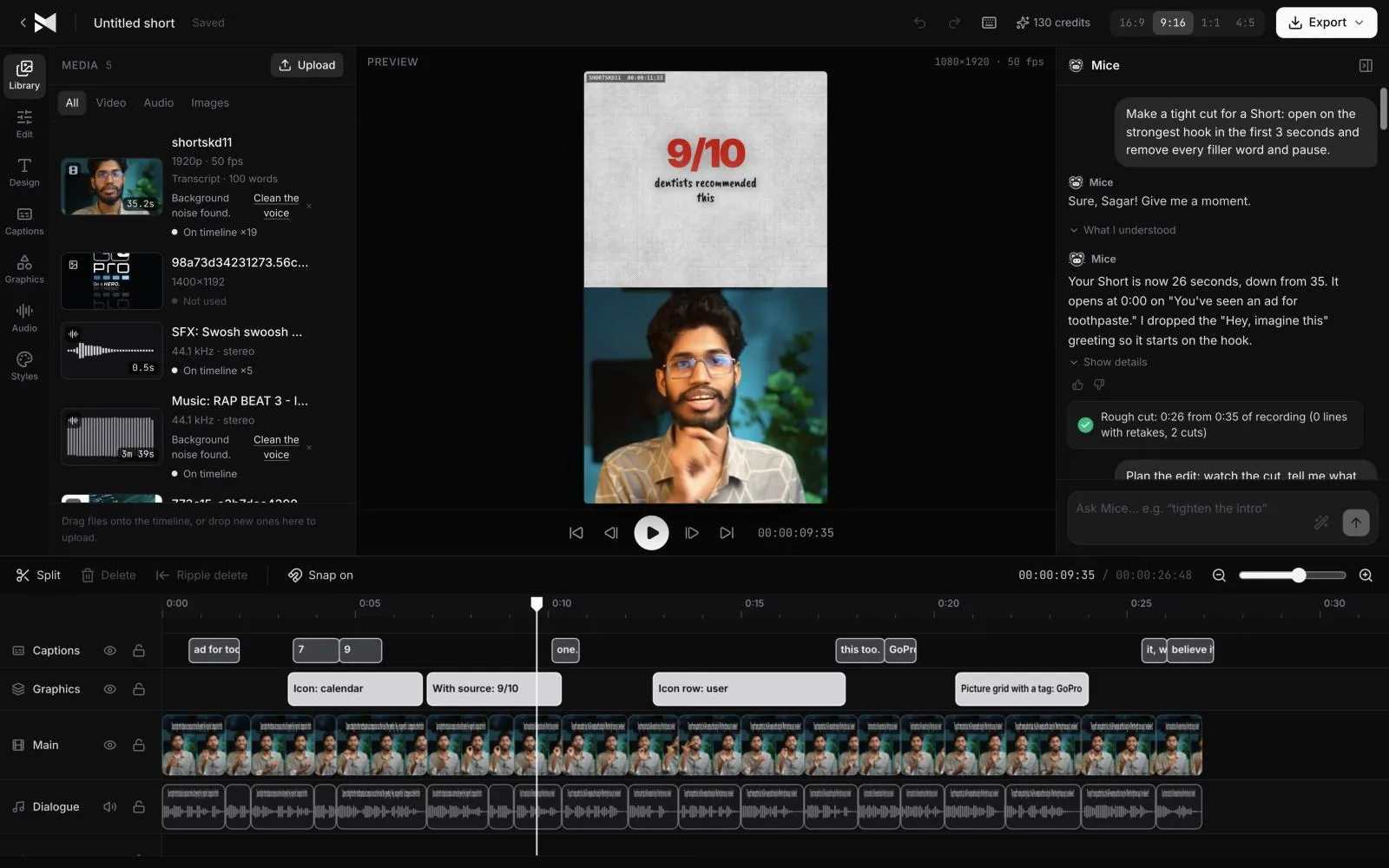
Many testimonial tools skip the customer altogether and have an AI presenter read a written review. That's fast, but it isn't the customer, and viewers can tell. This guide is about the opposite: turning a real customer's recording into a 15 to 60 second ad that keeps their face and voice. You can do each step by hand in any editor; below, each step also shows what to type to MirrorCut's agent to do it for you.
Start your free trial7 days free, then $10 a month. Works in your browser.
Just ask for it
Things you can type to MirrorCut's agent:
- “Make a 30-second ad from this customer interview, opening on the strongest result they mention”
- “Show the best line as a quote card with their name”
- “Add an end card with 20% off your first month and the code CREATOR20”
- “Make a 9:16 version for Reels and TikTok and a 1:1 version for the feed”
How it works
- 1
Get permission, then record or collect the clip
Ask the customer for written permission to use their words and image in ads before you edit anything. A video call recording, a phone selfie video or a clip they send you all work: what matters is that they talk about a specific problem and result, not just that they liked the product.
- 2
Find the line that opens the ad
Look for the sentence with a concrete result: a number, a before and after, or a moment of relief. That line is the hook, so it goes first, even if they said it at minute seven. In MirrorCut, ask for an ad that opens on the strongest result and the agent scores the moments and puts that one first.
- 3
Cut it to problem, solution, result
Keep the customer's own words, but in that order: what they struggled with, what changed when they used your product, and the outcome. Cut pauses, filler words and repeated takes so it lands in 15 to 60 seconds. Don't rewrite what they said: a testimonial works because it sounds like a person, not ad copy.
- 4
Add captions and a quote card
Most people watch ads with the sound off, so word-timed captions are essential. Put the single best line on screen as a quote card with the customer's name and role, so the claim lands even for someone scrolling past.
- 5
End with an offer and a clear next step
Close on an end card: your product, what to do next (try it, book a call, use a code) and, if you have one, an offer. One call to action, not three.
- 6
Export every format, then test versions
Export 9:16 for Reels, TikTok and Shorts, 1:1 or 4:5 for feeds and 16:9 for YouTube and your site. Then make two or three versions with different opening lines or different customers, and keep the one that performs best.
What MirrorCut does
Hook-first cutting
The agent ranks the moments in the recording by how quickly they grab attention and opens on the strongest result the customer mentions.
The customer's own words
Pauses, filler words and retakes are cut, but nothing is rewritten or generated: the person in the ad is your real customer.
Quote cards and offer end cards
Testimonial quote cards with the customer's name, stats and an offer end card with a promo code, from over 200 motion graphics templates.
Captions for sound-off viewing
Word-timed animated captions in 48 styles, kept in sync through every cut.
Every placement from one edit
9:16, 1:1, 4:5 and 16:9, each reframed around the customer as they speak, exported as MP4 up to 4K.
You approve every change
Each AI edit is outlined on the timeline and explained in one line. Accept it, revert it, or keep editing by hand; your edits and the agent's share one undo history.
Guides
- UGC vs founder-led ads: which should you run?UGC ads or founder-led ads? What each does well, when to use which, what they cost you in time, and how to test both with the same hook and offer.
- Video ad hooks: 30 examples, and how to find yours30 video ad hook examples by type (problem, result, question, contrast, proof), and how to find the strongest hook already in your own recording.
- How to write a video ad scriptHow to write a video ad script: hook, problem, product, proof and call to action, with a template, word counts by length and tips to sound natural.
Free tools
No sign-up; they run in your browser.
- Video aspect ratio calculatorEnter your video's size to see its aspect ratio, the largest crop for 9:16, 4:5, 1:1 and 16:9, and the standard HD and 4K output sizes for each.
- Text to SRT converterPaste a transcript and split it into caption lines of the length you choose, then download it as an SRT or VTT file with estimated timings.
Questions
- How long should a testimonial video ad be?
- For social feeds, 15 to 30 seconds usually works best, and up to 60 seconds when the story needs it. Open on the result in the first few seconds either way.
- Can I use a phone recording or a video call?
- Yes. A clear phone video or a recorded video call is enough. Good sound matters more than a perfect picture, and captions help either way.
- Should I script what the customer says?
- No. Ask open questions about their problem and result, then cut from what they actually said. Scripted testimonials sound like ads and lose the trust that makes them work.
- Do I need the customer's permission?
- Yes: get their written permission to use their words, name and image in ads before you publish. This isn't legal advice, so check the rules that apply where you advertise.
- What does it cost?
- Every account starts with 7 days of Creator free (a card is required). After that, Creator is $10, Pro is $30, Studio is $60 a month, and every yearly payment adds 50 bonus AI credits.
Bring one recording and see your first cut
7 days free, then $10 a month.
Start your free trial