Reframe horizontal video to vertical, around whoever is speaking
Quick answer
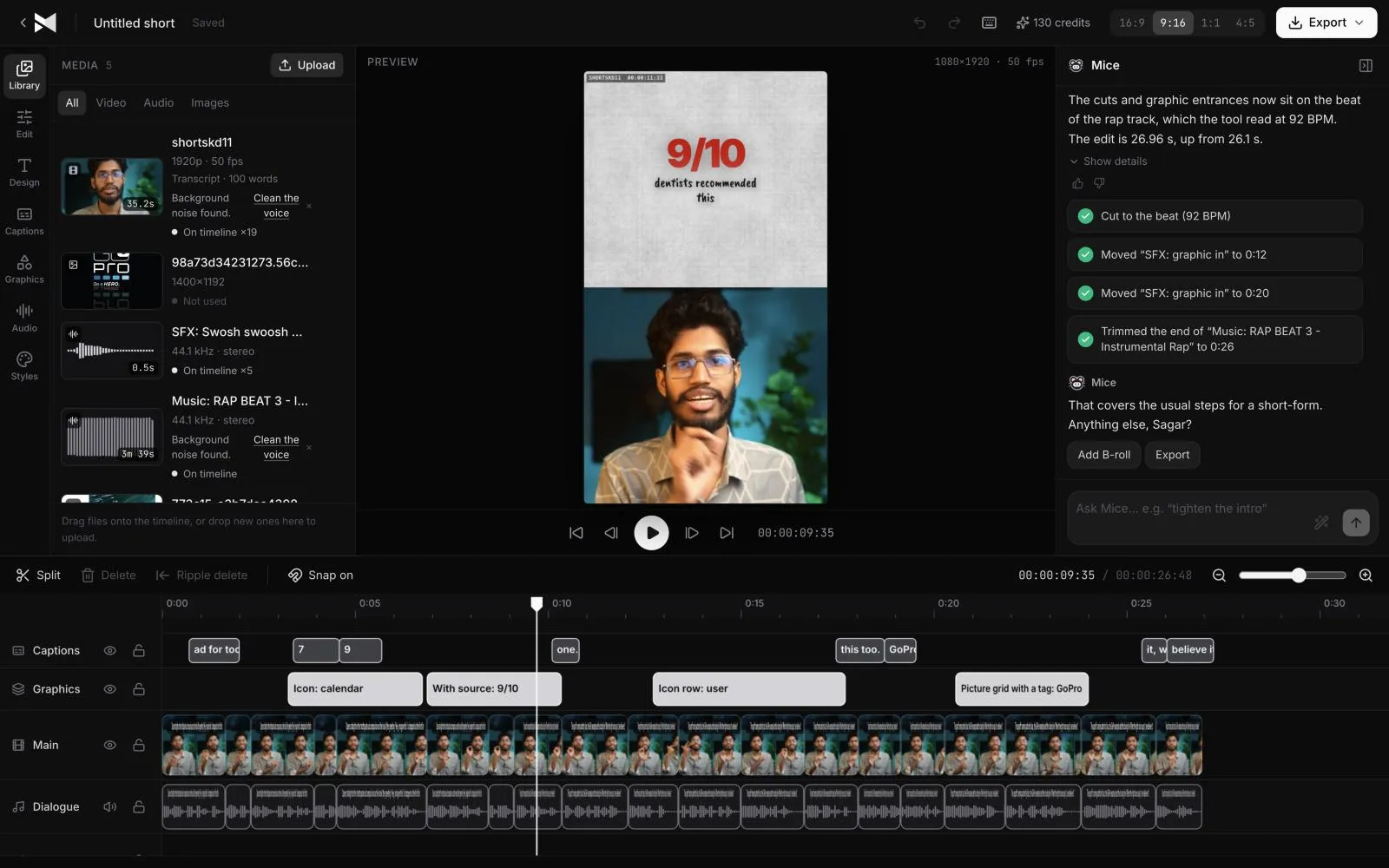
MirrorCut reframes each shot around the person speaking instead of using a fixed centre crop. Upload a horizontal recording and ask for 9:16, 1:1, 4:5 or all of them, and you get versions for Shorts, Reels, TikTok and feeds, with animated captions. Any shot can be adjusted on the timeline.
Recordings are shot wide, but Shorts, Reels and TikTok are vertical. A fixed centre crop cuts off whoever isn't in the middle of the frame, and reframing every shot by hand takes hours.
MirrorCut reframes each shot around the person speaking. One recording becomes 16:9 for YouTube, 9:16 for Shorts and Reels, and 1:1 or 4:5 for feeds, with animated captions on top and every shot adjustable on the timeline.
Start your free trial7 days free, then $10 a month. Works in your browser.
Just ask for it
Things you can type to MirrorCut's agent:
- “Reframe this to 9:16 and keep the active speaker centered”
- “Reframe this for Reels and keep the speaker centered”
- “Reframe to 9:16 and track the speaker's face”
- “Switch cameras to whoever is speaking, with a cut on each speaker change”
How it works
- 1
Upload your recording
MP4, MOV, MKV or WebM, from a single camera or several.
- 2
Pick the formats
Ask for 9:16, 1:1, 4:5 or all of them. The agent reframes each shot around the active speaker.
- 3
Adjust any shot
If a frame isn't right, adjust it in the editor or ask the agent to fix that shot. Nothing is baked in.
What MirrorCut does
One recording, every format
Switch between 16:9, 9:16, 1:1 and 4:5 from the same edit.
Follows the speaker
Each shot is framed around whoever is talking, including host-and-guest conversations.
Camera switching
With multi-camera recordings, the agent can cut to whoever is speaking on each speaker change.
Captions on top
Animated captions sit on every format and stay in sync after each cut.
You approve every change
Each AI edit is outlined on the timeline and explained in one line. Accept it, revert it, or keep editing by hand; your edits and the agent's share one undo history.
Guides
- How to make video ads with your phoneHow to make a video ad with just your phone: what to record, a simple setup for light and sound, filming several takes, and editing it into every format.
- How long should a video ad be?How long a video ad should be: 6 to 15 seconds for reach, 15 to 30 for most social ads, up to 60 for a story or demo, and how to pick by goal and audience.
Free tools
No sign-up; they run in your browser.
- Video aspect ratio calculatorEnter your video's size to see its aspect ratio, the largest crop for 9:16, 4:5, 1:1 and 16:9, and the standard HD and 4K output sizes for each.
- Video file size and bitrate calculatorWork out a video's file size from its length and bitrate, or the bitrate to export at so it fits a size limit. With YouTube's recommended bitrates.
Questions
- Which aspect ratios are supported?
- 16:9, 9:16, 1:1 and 4:5, the formats YouTube, Shorts, Reels, TikTok and feed posts use.
- What happens when two people are on screen?
- The agent frames the person who is speaking, and moves to the other when they start talking.
- Can I fix a shot the AI framed badly?
- Yes. Every reframe stays editable, and you can ask the agent to redo a single shot.
- What does it cost?
- Every account starts with 7 days of Creator free (a card is required). After that, Creator is $10, Pro is $30, Studio is $60 a month, and every yearly payment adds 50 bonus AI credits.
Bring one recording and see your first cut
7 days free, then $10 a month.
Start your free trial