An AI video editor built for talking-head video
Quick answer
MirrorCut is an AI video editor for talking-head videos, lectures, webinars and interviews. Describe the edit in plain words and its AI agent does the first pass: cutting pauses and retakes, tightening the opening, adding captions and pulling out clips for social. You refine it through chat or on the timeline and approve every change.
A talking-head video is one person speaking to camera: a YouTube explainer, a lesson, a founder update, a webinar. Recording one is easy. Editing it is where the hours go: cutting the pauses and retakes, tightening the opening, keeping one speaker interesting, adding captions, and pulling out clips for social.
MirrorCut is an AI video editor for solo creators that does that first 80% for you. Describe the edit in plain words, and the agent builds an editable first cut. Then refine it through chat or directly on the timeline; you keep the last 20%.
Start your free trial7 days free, then $10 a month. Works in your browser.
The best talking-head video editors, compared →
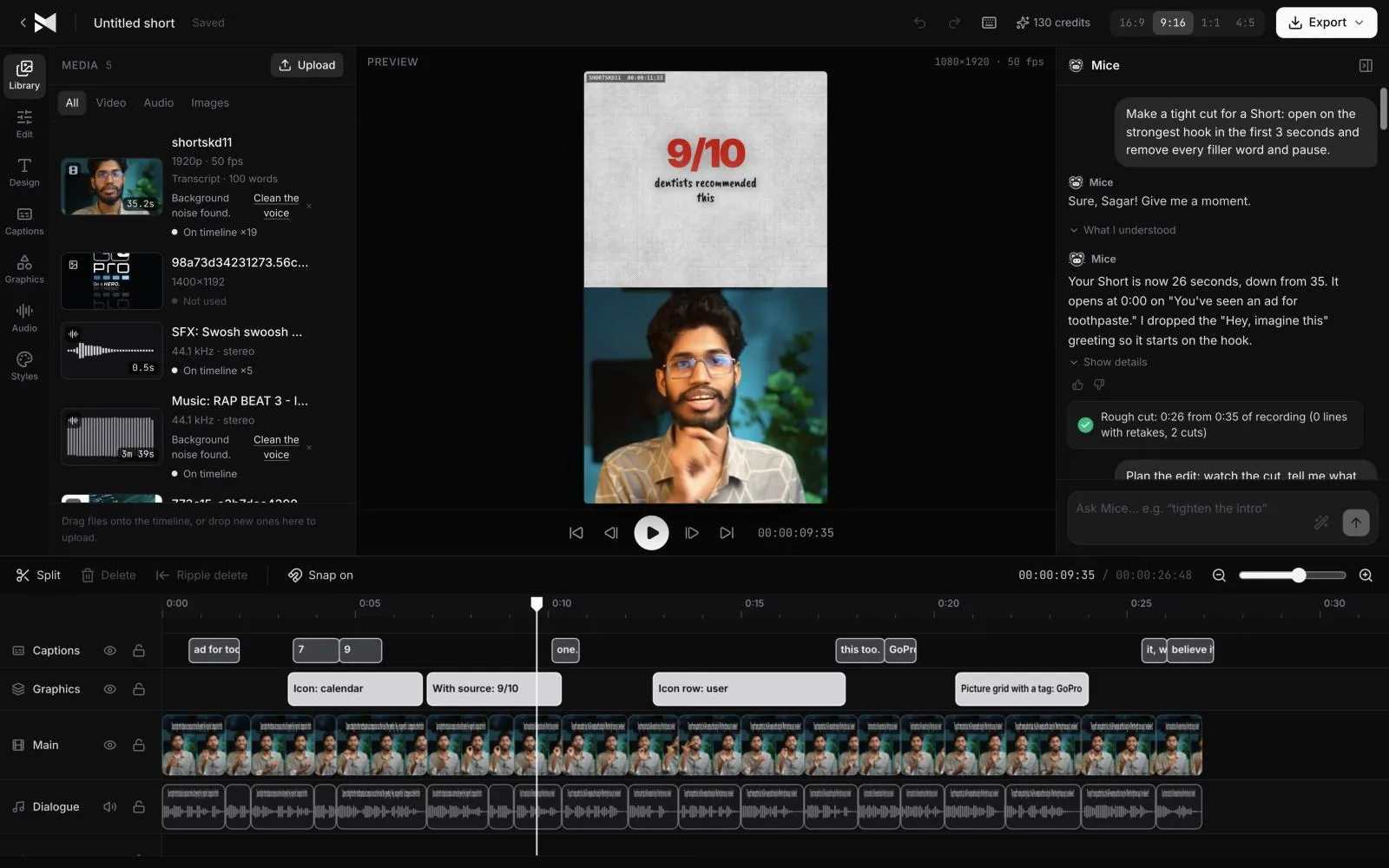
Just ask for it
Things you can type to MirrorCut's agent:
- “Tighten the first 30 seconds so the hook lands faster”
- “Cut this down to the best 10 minutes, keeping the story intact”
- “Split this recording into lessons with a title card for each”
- “Make a 2-minute recap of this webinar with captions”
How it works
- 1
Upload
Bring your recording: MP4, MOV, MKV or WebM video, images, or MP3, WAV and M4A audio.
- 2
Describe the edit
Use a prompt, your footage, or both. MirrorCut builds an editable first cut.
- 3
Refine and review
Refine through chat, or right on the timeline. The agent patches the edit instead of starting over, and every change is yours to accept.
What MirrorCut does
Cut the dead air
Retakes, false starts, filler words and long pauses go, with a natural breath kept between sentences, so the video moves at the pace of a good edit.
Keep one speaker interesting
Cut away to real stock B-roll when you mention something, add a title or a stat from over 200 graphic templates, and with a camera per person, switch to whoever is speaking.
Highlights and recaps
Pull the strongest moments into Shorts, a highlight reel, or a short recap.
Captions and reframing
Animated captions and reframes for 9:16, 1:1 and 4:5 from the same edit.
Export when it's done
Render the finished video as MP4 at up to 4K, or download the captions as SRT or VTT. Everything runs in your browser.
You approve every change
Each AI edit is outlined on the timeline and explained in one line. Accept it, revert it, or keep editing by hand; your edits and the agent's share one undo history.
Guides
- How to edit a talking-head videoHow to edit a talking-head video: cut pauses and retakes, open on your best line, add cutaways and captions, and keep it moving without overdoing it.
- 25 talking-head video ideas for founders and creators25 talking-head video ideas for founders and creators, grouped by goal, with how to open each one and how to turn a single recording into several videos.
- Founder-led video ads: how to record and edit oneHow to make a founder-led video ad: what to say, how to record it without a script, and how to cut it into ads that open on the problem, with formats to try.
Free tools
No sign-up; they run in your browser.
- Online teleprompterA free teleprompter in your browser: paste your script, set the speaking pace and text size, mirror it for a glass, and go full screen while you record.
- Text to SRT converterPaste a transcript and split it into caption lines of the length you choose, then download it as an SRT or VTT file with estimated timings.
Questions
- What counts as a talking-head video?
- Any video where one person talks to camera for most of it: YouTube explainers, course lessons, founder updates, vlogs and webinar recordings. MirrorCut handles all of them, as well as interviews and podcasts with several speakers.
- How do I edit a talking-head video faster?
- Let the first pass happen automatically: cut the pauses, filler words and retakes, build a cut from your best moments and add captions. Then spend your time on the choices that need you. In MirrorCut you ask for that first pass in plain words and review each change.
- Can it remove ums and long pauses?
- Yes. Ask MirrorCut to remove dead air and filler words: long pauses are shortened to a natural length and ums and uhs are cut, as one change you can accept or undo.
- Who is MirrorCut for?
- Solo creators who record podcasts, interviews or talking-head videos and spend hours editing each one. The agent does the first pass; you stay in control of the final cut.
- Can I edit by hand too?
- Yes. MirrorCut is a real timeline editor. Edit by hand, through chat, or both, with one shared undo history.
- Can I finish the edit in Premiere Pro?
- That's planned for launch: a Premiere Pro XML or OpenTimelineIO export with your cuts, tracks and timing, plus caption layers for After Effects. These exports aren't available yet.
- What does it cost?
- Every account starts with 7 days of Creator free (a card is required). After that, Creator is $10, Pro is $30, Studio is $60 a month, and every yearly payment adds 50 bonus AI credits.
Bring one recording and see your first cut
7 days free, then $10 a month.
Start your free trial