Turn a full podcast episode into Shorts
Quick answer
Upload the full episode to MirrorCut and ask for Shorts. Its AI agent scores the strongest moments by how well they hook, cuts each into a vertical clip that follows whoever is speaking, and adds animated captions. Each Short opens as its own timeline, so you can trim it, swap the hook or change the captions before you export.
A long episode usually holds several moments strong enough to stand alone as a Short, Reel or TikTok. Finding them means scrubbing the whole recording, then cutting, reframing and captioning each one by hand.
MirrorCut's agent does that first pass for you. It reads the episode, scores the strongest moments by how well they hook, cuts each into a vertical clip that follows whoever is speaking, and adds animated captions. You review the result on a real timeline and keep what works.
Start your free trial7 days free, then $10 a month. Works in your browser.
Shorts from any long video: webinars, livestreams, lessons →
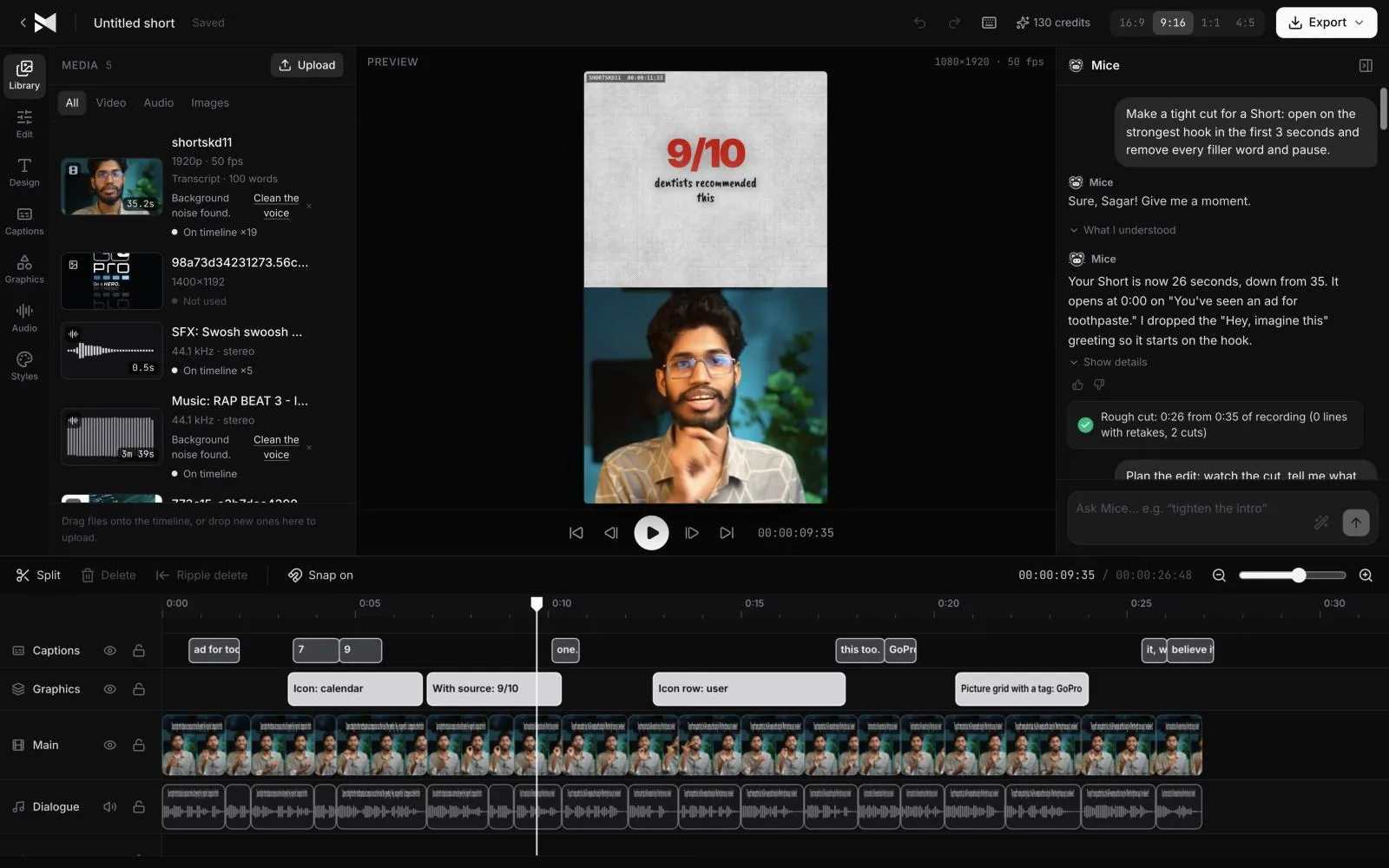
Just ask for it
Things you can type to MirrorCut's agent:
- “Find the five strongest moments and cut each into a Short”
- “Make a 30-second Short from the strongest hook in this episode, with captions”
- “Reframe the guest's answers to 9:16 for Reels”
- “Prepare each Short for TikTok, Reels and YouTube Shorts”
How it works
- 1
Upload the episode
Drop in the full recording: MP4, MOV, MKV or WebM video, or MP3, WAV and M4A audio. Large files upload in the background and resume if your connection drops.
- 2
Ask for Shorts
Tell the agent what you want in plain words, such as how many clips, how long, and which caption style. It builds an editable first cut instead of a finished render you can't change.
- 3
Review and refine
Each Short opens as its own timeline. Trim it, swap the hook, change the captions, or ask the agent for another pass. It patches the edit instead of starting over.
What MirrorCut does
Strongest moments, scored by hook
The agent ranks moments by how quickly they grab attention, so the clips you see first are the ones most likely to hold a viewer.
Reframing that follows the speaker
Horizontal footage becomes 9:16 with the active speaker kept in frame, including switching between host and guest.
Captions that stay in sync
Animated, word-by-word captions in 48 styles. They follow the audio after every cut, so trimming a clip never breaks them.
Each Short is its own timeline
Clips aren't flattened videos. Every one stays editable, with the same tools as the main edit.
You approve every change
Each AI edit is outlined on the timeline and explained in one line. Accept it, revert it, or keep editing by hand; your edits and the agent's share one undo history.
Guides
- How to turn a podcast into ShortsHow to turn a podcast episode into Shorts and Reels: find moments that stand alone, cut to the hook, reframe to vertical, caption and post them.
- How to edit a podcastHow to edit a podcast step by step: mark the episode, make the big cuts, remove pauses and filler, balance the voices, then add chapters and clips.
Free tools
No sign-up; they run in your browser.
- Video aspect ratio calculatorEnter your video's size to see its aspect ratio, the largest crop for 9:16, 4:5, 1:1 and 16:9, and the standard HD and 4K output sizes for each.
- YouTube chapters generatorPaste your timestamps and get a YouTube chapter list ready for the description, checked against YouTube's rules: 00:00 first, three or more, 10 seconds each.
Questions
- How many Shorts can MirrorCut make from one episode?
- As many as you ask for. A common request is the five strongest moments; you can also ask for a single teaser or a longer highlight reel.
- Does it work with video podcasts recorded on several cameras?
- Yes. Ask the agent to switch to whoever is speaking, and it cuts between speakers and reframes each shot for vertical.
- What does it cost?
- Every account starts with 7 days of Creator free (a card is required). After that, Creator is $10, Pro is $30, Studio is $60 a month, and every yearly payment adds 50 bonus AI credits.
Bring one recording and see your first cut
7 days free, then $10 a month.
Start your free trial